 Teleprompter Pro
Mastering Teleprompter Delivery: How To Look And Sound Natural
Read our guide to looking and sounding natural when using a teleprompter, including settings and scriptwriting tips.

Mastering Teleprompter Delivery: How To Look And Sound Natural
To use a teleprompter or not to use a teleprompter? It’s a question most content creators ask at some point. In some ways, using a teleprompter can seem like a no-brainer – fewer mistakes and filler words, quicker recording and editing, and an overall more professional feel. But some people shy away from using one, thinking that it will make them sound unnatural or even robotic.
Below, we share some simple tips on using a teleprompter, so you can feel, sound, and look more natural. We’ll also dive into some common myths and challenges of using a teleprompter, advise on how to set yours up, and even share some scriptwriting tips.
Why looking natural matters
Looking natural on camera is crucial for building a connection with your audience. Your audience wants to feel like you’re talking to them, not reading from a screen.
Natural, confident delivery can also help your message to stick. When you speak in everyday conversation, you vary your pace, emphasise key points, and allow space for your listener to digest what you’re saying. If you race through your lines or speak in a robotic tone, people will zone out or miss important details. Nailing your delivery is therefore even more important when presenting online, where viewers can scroll away at the swipe of a finger.
Why use a teleprompter at all?
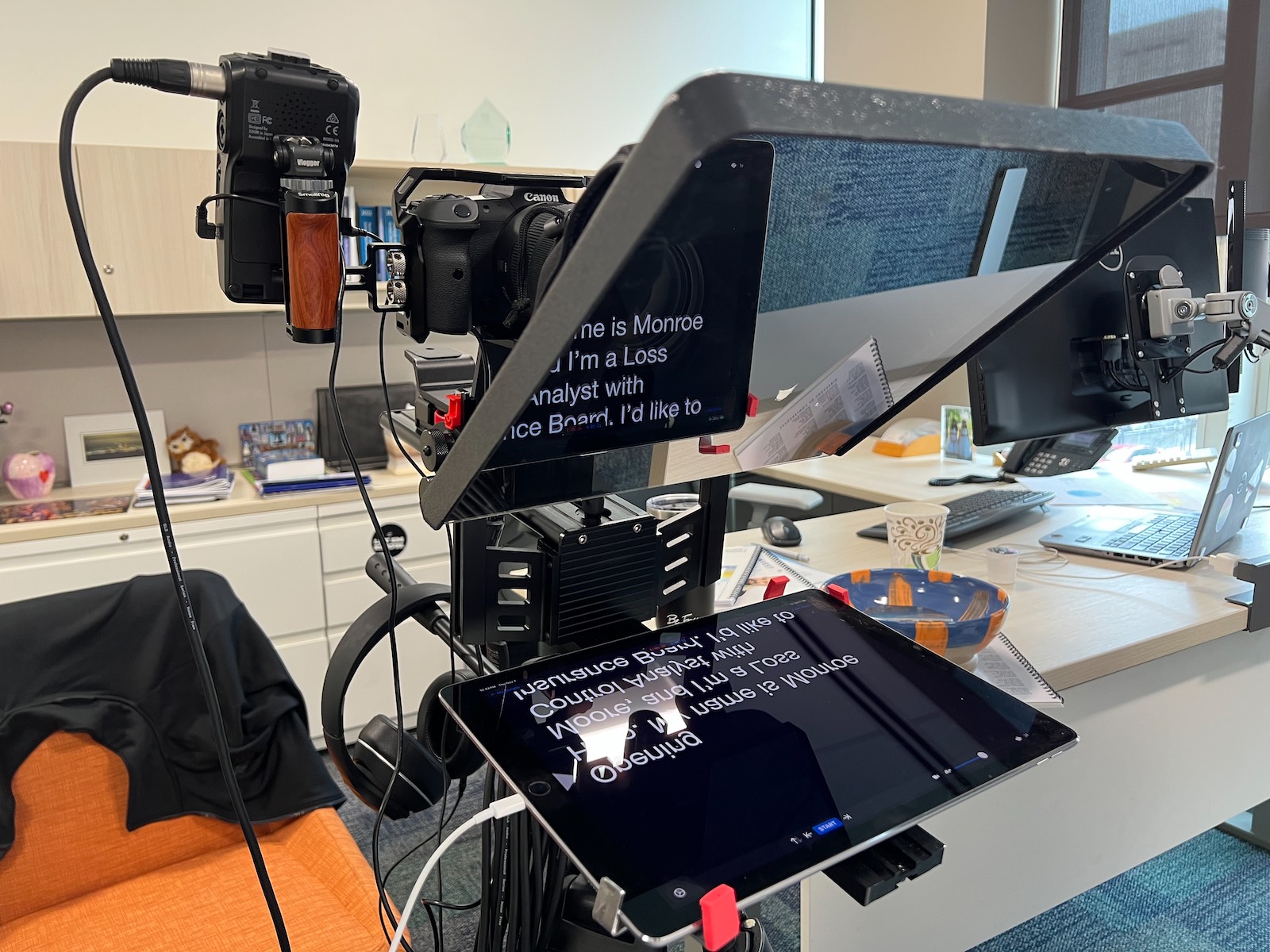
A teleprompter allows you to maintain eye contact with the camera while reading, which is almost impossible to do without one. This makes them invaluable for when you need to deliver precise information – think training videos, product explainers, public announcements, webinars, and marketing campaigns. They’re also useful if you’re nervous on camera – having your notes in front of you can give you a massive confidence boost.
But using a teleprompter doesn’t automatically make you sound robotic. In fact, it can aid your delivery, allowing you to focus on your tone and body language, rather than trying to remember your lines.
Looking and sounding natural while using a teleprompter is all about the right preparation, practice, and settings, as we’ll cover below.
Looking for more inspo? Check out these 9 ways a teleprompter can level up your content creation.
Common challenges of using a teleprompter
Most people who struggle with a teleprompter do so for the same handful of reasons. They speak in a robotic tone, stare blankly at the screen, stumble over words, or rush through lines because they can’t keep up with the scroll speed. But while these issues can be true, they can also be easily prevented with a few small adjustments.
Preparing your script
A stiff script almost guarantees a stiff delivery, and what sounds good on paper doesn’t always translate well to speech. Follow these tips for the most natural-sounding result:
Write like you speak
The easiest way to make sure your script sounds natural is to write how you would normally speak. You can do this by dictating your thoughts into a voice memo first, and then transcribing and tidying everything up later for clarity and conciseness.
Use contractions, rhetorical questions, and personal anecdotes to add personality – just like you would in everyday conversation. And don’t shy away from short pauses or filler words, as these can help you sound more human, even if they’re not ‘correct’.
It might also help to read your sentences aloud as you edit your script, to make sure the lines roll off your tongue.
Consider how much detail you want to include
One of the biggest questions content creators have when preparing a script for a teleprompter is how much information to include. Should you write up the entire script, or keep it to a few bullet points? There’s no correct answer – it depends on what feels most comfortable to you.
If you’re a naturally good speaker, you might prefer to be guided by bullet points. But if you’re not so confident or tend to go off on a tangent when speaking, it might be easier to have the full script in front of you.
Mark up your script with speech cues
If you upload every word of your script into your teleprompter app, you’ll feel compelled to read every word. This is when the dreaded robotic tone can kick in. But you can counteract this by marking up your script with delivery cues, for example:
- Underlining words you want to emphasise
- Inserting breaks or slashes where you want to pause
- Adding notes for specific facial expressions or hand gestures
These marks will remind you to vary your voice and body language, and help break up long sentences into more manageable chunks.
Practice
Practising your speech is always a good idea, but especially so if you’re using a teleprompter. The more familiar you are with your script, the less you’ll rely on the screen, and you can therefore focus better on looking natural.
Adjust your settings
Start by reading your script out loud with a teleprompter to get a feel for the pacing and phrasing. Adjust the scroll speed, text size, and margins to what feels most comfortable. With enough practice, you should be able to increase the scroll speed to match your natural speaking pace.
Record and give yourself feedback
Record yourself during these practice sessions (a free teleprompter app like Teleprompter Pro has built-in selfie recording to make this easier). Look out for things that make you look nervous or stiff i.e. wandering eyes, flat tone, fidgety hands, etc. And if you stumble on certain words or sections of your script, rewrite or rehearse them until they flow naturally. Remember – your goal isn’t to memorise your script word for word, but to familiarise yourself with the message so you can focus on connecting with your audience through your tone and body language.
Mix it up
To keep your practice interesting and keep your energy up, you could vary the way you rehearse. Practice each segment separately, or record multiple takes with slight variations. If you’re comfortable with it, you could even invite a friend or colleague to watch and give feedback through fresh eyes.
Delivery techniques
Here’s what to do when the camera starts rolling:
Maintain eye contact
Research suggests that presenters who maintain good eye contact are perceived as more intelligent and trustworthy by viewers. That’s why eye contact is probably the most important aspect of looking natural and confident on camera. But even though you’ll be looking towards the camera while using a teleprompter, the illusion of eye contact will be easily broken if it’s obvious that you’re reading. So here are a few tips to make sure your eye contact looks natural and genuine:
- Position your camera at eye level: It helps to use a free teleprompter app like Teleprompter Pro, so you can easily position your phone and record while looking at the camera.
- Let your eyes move naturally: Humans don’t usually stare unblinkingly when talking – we look around, blink, and occasionally glance up to think.
- Adjust your teleprompter settings: You may need to change the settings on your teleprompter to prevent your eyes from moving from side to side when reading. For example, larger margins will reduce the spread of text across the screen, meaning your eyes barely have to move.
Use your body and face to help tell the story
In everyday conversation, we smile, raise our eyebrows, and talk with our hands. So if you want to look natural when using a teleprompter, you’ll have to do all this too. Imagine you’re talking to a friend while reading your script – this will help you gauge if your body language is too stiff.
Tone and volume, and pacing
Monotone delivery is what makes a speech sound robotic, so it’s exactly what you want to avoid. For the most natural result, you should vary your tone and intonation at appropriate moments, e.g. speak louder when you’re excited, soften your voice for more intimate moments, or pause for emphasis.
Pacing is super important too. A slow, yet natural pace will help your audience process what you’re saying and keep them engaged. So you should avoid rushing through sentences to keep up with your telepropter’s scroll speed. Instead, slow down the teleprompter if need be and make room for pauses in your script by breaking it up into paragraphs.
Do relaxation exercises before recording
Relaxing your body and mind before your recording session can make a huge difference to your delivery. Try some breathing exercises or vocal warmups like humming or tongue twisters to relax your facial muscles. And don’t forget your posture! You’ll have more energy and breath support when standing up straight compared to sitting.
Embrace imperfections
Small stumbles, laughs, and the odd filler word will humanise your delivery, rather than take away from it. So if you trip over a word, don’t panic. Just pause, take a breath, and pick up where you left off. Most teleprompters, including Teleprompter Pro, can be controlled remotely with a clicker, so it’s a good idea to use one if you’re not a confident speaker.
Break up your recording sessions
For longer scripts, it might help to record in sections, taking breaks in between. This will give you a chance to relax between takes and maintain consistent energy throughout.
Setup and environment
Even the most polished presenter will struggle if their teleprompter is set up poorly. Follow these setup guidelines to support a more natural delivery:
- Align your teleprompter with the camera lens or use a teleprompter app: If the teleprompter is too far away from the camera lens, your eye movements will be noticeable.
- Screen size and font: Choose a device with a screen big enough to show multiple lines of text, or reduce the font size so that you can see ahead and read fluently. Teleprompter Pro is available on iOS, so you can use it on your iPhone or iPad.
- Adjust the font size, colour, and margins to suit your eyesight: Depending on the lighting or colours of your environment, you might prefer black or white text, or even a different colour.
Recommended teleprompter settings
Teleprompter Pro’s suite of settings can help you look more natural while reading your script. Here are the key settings to focus on and how to adjust them:
Scroll speed
Your natural speaking pace should dictate the speed, rather than the teleprompter’s default setting. Start off slow and gradually increase the speed until the scroll keeps up with your natural rhythm. If you find yourself racing through the script or tripping over the words, slow the scroll down.
Margins
A smaller text size can help you read more ahead, allowing you to deliver the script more fluently. On the other hand, larger fonts will reduce the need for pronounced eye movements. Play around with font sizes before recording to find your happy medium, and reduce the width of the text block to minimise side-to-side eye movements.
Colour and background
Changing the text and/or background colours can reduce eye strain, which can be particularly helpful if you’re recording for a long time.
Cue indicators
Visual cues, like an arrow or line, can help you stay on track without darting your eyes around. Cue points let you jump to specific sections of your script, making retakes easier.
Timed scrolling
If you’re working within a specific time limit, you can set a target time on your teleprompter. Teleprompter Pro allows you to adjust the scroll speed so that your script finishes at the right moment.