 Teleprompter Pro
Introducing: Captions
Better Captions for Your Videos
Today, we’re introducing Captions — a brand new app designed to help creators add great animated subtitles to their videos.
Captions is available for free pre-order starting today on the App Store, and it officially launches on April 7th, 2026.
All pre-orders will receive lifetime access to Captions Pro for free — forever. No subscriptions or upgrades. This is a one-time opportunity exclusively for pre-orders.
What is Captions?
Captions lets you add professional animated subtitles to your videos, to help to maximise your views and engagement across on any platform.
Escape the Platforms
With Captions, your video doesn’t need to be uploaded or posted to a social pltform just to add subtitles. Everything happens on your device. You import your video, generate captions, customise the look, and export a finished file — ready to share anywhere.
Your Content Stays Yours
When you upload a video to a social platform to edit it, you’re also handing over your content and data to that platform.
Captions is not a social platform, so it doesn’t work that way. Captions processes your video directly on your device. Your footage isn’t uploaded to a social network just to generate subtitles. Your drafts aren’t analysed for ad targeting. Your data isn’t repurposed to train recommendation algorithms.
What Can Captions Do?
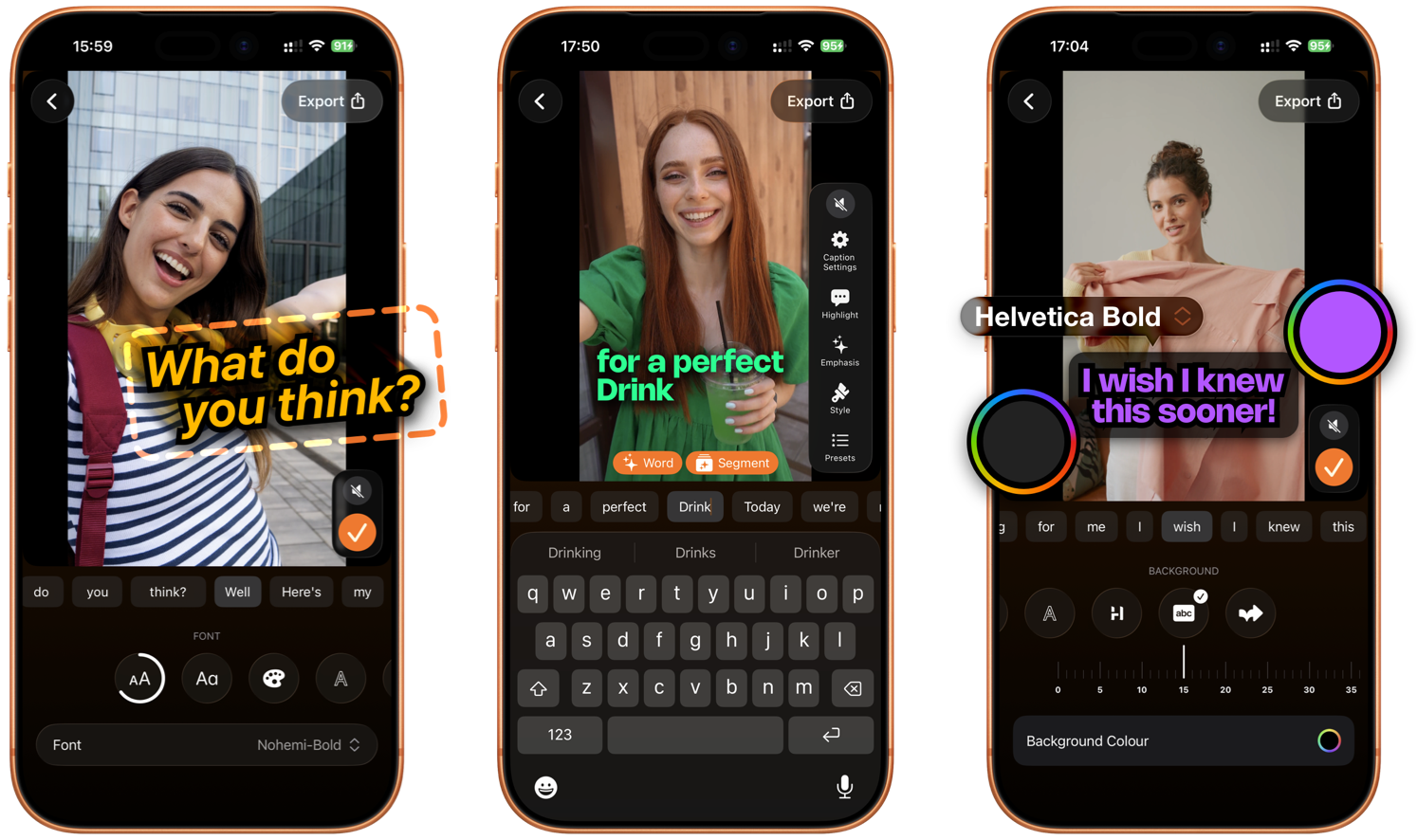
Captions combines automation, design flexibility, and intelligent tools to make adding subtitles effortless.
- Automatic Transcription: Captions automatically transcribes the speech in your video into accurately timed subtitles.
- Animated Captions: Generate great-looking animated captions instantly, designed to capture attention.
- Real-Time Preview: See your captions update live as you edit and refine the style.
- Intelligent Suggestions: On-device Apple Intelligence suggestions help improve the look and presentation of your captions.
- Full Text Editing: Edit, re-type, or adjust any individual caption at any time.
- Customisable Styles: Adjust fonts, colours, borders, and backgrounds to match your brand.
- Preset Styles: Quickly apply professionally designed preset styles for a new look in seconds.
Intelligent Suggestions
 Captions also features on-device Apple Intelligence suggestions help improve the look and presentation of your captions, based on the setiment and overall message in your video.
Built for Creators
Fifteen years ago, we launched Teleprompter Pro.
Since then, it has become one of the most widely used tools in the video production industry. Today, more than 3 million videos are recorded every month using Teleprompter Pro.
We’ve learned a lot over the past 15 years. Most importantly, we’ve learned that creators deserve great tools — tools that are powerful, intuitive, and thoughtfully designed.
Captions is the next step in that journey.
Video doesn’t stop when recording ends. Once you’ve captured your content, you need tools to maximise its reach and impact. Captions was built to help creators do even more with their videos.